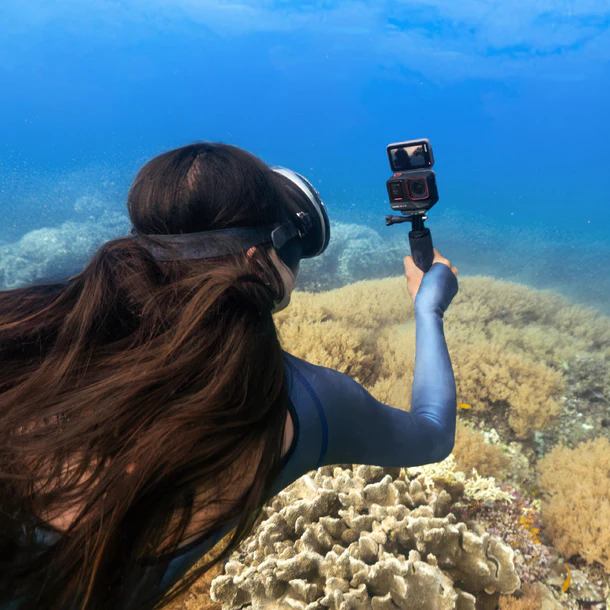
Understanding the Insta360 Camera
The emergence of 360-degree photography has revolutionized how we capture and share our experiences. One of the leading devices in this innovative field is the Insta360 camera series. With its advanced features, exceptional capabilities, and user-friendly design, Insta360 makes it easy for enthusiasts and professionals alike to create immersive content. This article delves into the core aspects of the Insta360 camera, exploring its features, benefits, and specifications to help you maximize your creative potential.
Insta360 Features Overview
The Insta360 camera series encompasses several models, each designed with specific features aimed at enhancing the user’s creative ability. Key features include:
- 360-Degree Capturing: Capture everything around you in one shot, providing a unique viewing experience for the audience.
- High Resolution: Record stunning 4K and 5.7K footage, ensuring clarity and detail are maintained, even during fast-paced action.
- Stabilization Technology: Insta360 cameras feature advanced stabilization, giving your videos a professional, smooth quality without needing bulky equipment.
- Live Streaming: The ability to go live directly from the camera allows content creators to engage with their audience in real time.
- Editing Software: The accompanying app offers tools that let users edit and create stunning videos and photos right from their devices.
Benefits of 360-Degree Photography
Utilizing a 360-degree camera such as Insta360 provides numerous benefits, making it a worthwhile investment for content creators. These include:
- Immersive Experiences: Viewers can control their scene and explore every angle, which increases engagement and enhances storytelling.
- Versatile Applications: Whether for travel vlogs, real estate tours, or extreme sports, 360-degree content can be tailored for various industries.
- Enhanced Creativity: The unique perspectives enabled by 360-degree technology inspire creative content creation, pushing the boundaries of conventional photography.
- Easier Follow-Up Content: Capturing every angle allows for multiple derivations of content from a single recording session, saving time and effort.
Key Specs to Consider
Understanding the specifications of the Insta360 cameras is essential to choose the right model for your needs. Important specs to check include:
- Resolution: Look for models that offer at least 4K video quality for clear, professional results.
- Frame Rate: A higher frame rate is necessary for capturing action sequences smoothly.
- Battery Life: Ensure the battery can last throughout your shooting sessions, especially for long events or shoots.
- Storage Capacity: Assess internal storage and the capability of external card options to meet your recording needs.
Getting Started with Insta360
Once you decide on the perfect Insta360 camera for your photography needs, you'll need to learn how to set it up and begin capturing breathtaking moments. Here's how to get started.
Unboxing and Initial Setup
Unboxing your Insta360 camera is just the beginning of the adventure. Here are some steps to ensure an effective setup:
- Check the Contents: Ensure all components like the camera, battery, charging cable, and mounting gear are included.
- Charge the Battery: Before the first use, charge the camera fully for optimal performance.
- Install the App: Download the Insta360 app to your smartphone to access all features and controls.
- Pair the Devices: Connect your camera with the app via Bluetooth and follow the setup prompts.
Essential Accessories and Add-ons
Accessories can significantly enhance your Insta360 experience. Key add-ons include:
- Selfie Sticks: Ideal for creating floating effects and being able to capture your surroundings from a distance.
- Protective Cases: To keep your camera safe during outdoor activities.
- Tripods: Perfect for stable shots during timelapse or long exposures.
- External Microphones: Improve audio quality, especially for video content.
Integrating with Your Devices
Easy integration is one of the many advantages of using an Insta360 camera. To begin integrating:
- Connect to Smartphones: Use the Insta360 app for editing and sharing as well as controlling camera settings remotely.
- Use with Computers: Transfer files to editing software for more in-depth editing capabilities.
- Explore Cloud Options: For easy storage and sharing, utilize cloud services offered through the app.
Creative Techniques for Capturing Content
To truly make the most of what the Insta360 can offer, understanding creative techniques will significantly improve your results.
Unique Shooting Angles and Perspectives
One of the great aspects of the Insta360 camera is its ability to capture unique angles. Here are a few tips:
- High Perspectives: Mount your camera on a tall pole or roof for breathtaking aerial shots.
- Low Angles: Shooting close to the ground can provide an interesting perspective on your subjects.
- Overhead Shots: Create compelling content by capturing scenes directly from above.
Using the Insta360 App for Editing
The accompanying Insta360 app is a powerful editing tool. Take advantage of features like:
- Auto-Editing: The app can automatically create highlight reels based on your footage.
- Filters and Effects: Add filters, music, and effects for more dynamic presentations.
- Seamless Exporting: Easily export your finished videos to share across multiple platforms directly from the app.
Tips for Capturing Action Shots
Capturing action with an Insta360 camera can yield stunning results. Consider these tips:
- Stabilization: Ensure the camera’s stabilization feature is active to eliminate shaky footage.
- Anticipate Movement: Position your camera in anticipation of where the action will take place for optimal shots.
- Use Timelapse: Experiment with timelapse settings to capture action sequences over time effectively.
Sharing and Distributing Your Content
Once you’ve captured and edited your content, sharing it effectively is the next crucial step. Consider these strategies:
Best Platforms for Sharing Insta360 Content
Various platforms are excellent for sharing 360-degree content. Choose based on your audience:
- YouTube: Supports 360-degree videos, allowing viewers to explore.
- Facebook: Its support for 360-degree images and videos makes it ideal for community engagement.
- Instagram: Use Stories and posts to share clips, although 360 content may need to be edited down.
- Your Website: Embed 360 videos directly on your site for increased engagement.
Leveraging Social Media to Increase Reach
Utilizing social media effectively can significantly broaden your audience:
- Consistency: Maintain a posting schedule to keep your audience engaged with fresh content.
- Engagement: Interact with followers through comments, polls, and live sessions.
- Use Hashtags: Target your posts with relevant hashtags to reach broader audiences.
Engaging Your Audience Effectively
Engagement goes beyond just sharing content. Here’s how to connect with your audience:
- Ask Questions: Ending posts with questions can encourage feedback and interaction from viewers.
- Host Contests: Create challenges or contests that require followers to engage with your content.
- Collaborate: Partner with other creators to increase visibility and engagement through shared audiences.
Frequently Asked Questions About Insta360
What is the battery life of the Insta360 camera?
The battery life of Insta360 cameras typically lasts about 60 to 80 minutes, depending on usage. Always have spare batteries for longer shoots.
Can I use Insta360 for live streaming?
Yes, many Insta360 models support live streaming directly to platforms like YouTube and Facebook, enhancing viewer engagement.
What formats can Insta360 videos be exported in?
You can export Insta360 videos in popular formats such as MP4 or MOV, making them compatible with various editing software and platforms.
How to mount Insta360 for different activities?
Use a variety of mounts like helmet mounts for sports, tripod mounts for static shots, or handheld mounts for dynamic, stabilized filming.
Is there warranty support for Insta360 devices?
Insta360 devices typically come with a one-year warranty covering manufacturing defects. Check the specifics for your device upon purchase.